





QR CODE TICKETS: simplicity and speed at your fingertips!
Start Romagna takes a step forward in the digitalization of its service:starting from March 1, public transport paper tickets are issued in QR Code format.
This innovation makes the validation process faster, safer, and more modern, improving the travel experience for everyone.
A simple technology that makes traveling more convenient for all.
Where is it available?
In the Forlì Cesena and Rimini areas:
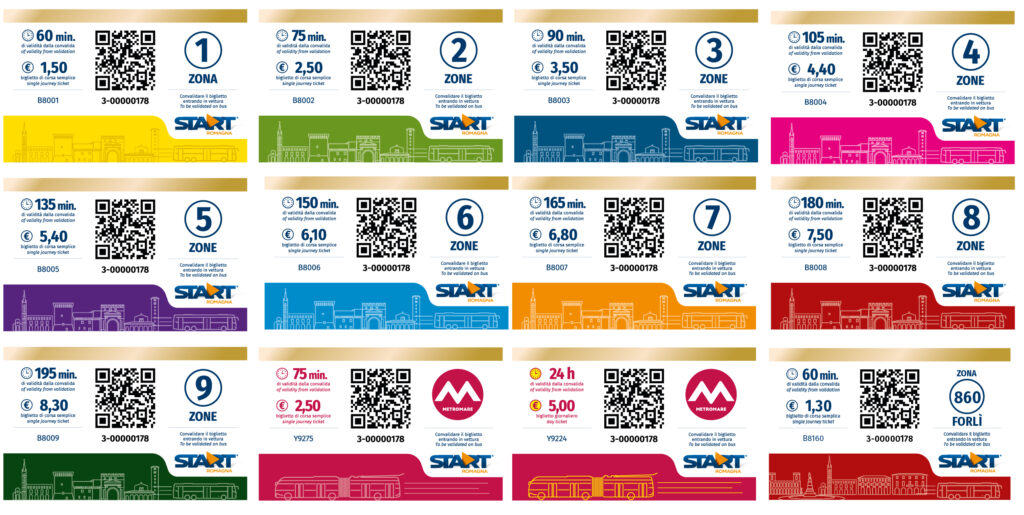
The following tickets are already available in paper format with QR Code:
- Urban Ticket
- Single Ride Ticket
- Multi-Ride Ticket
- Day Ticket
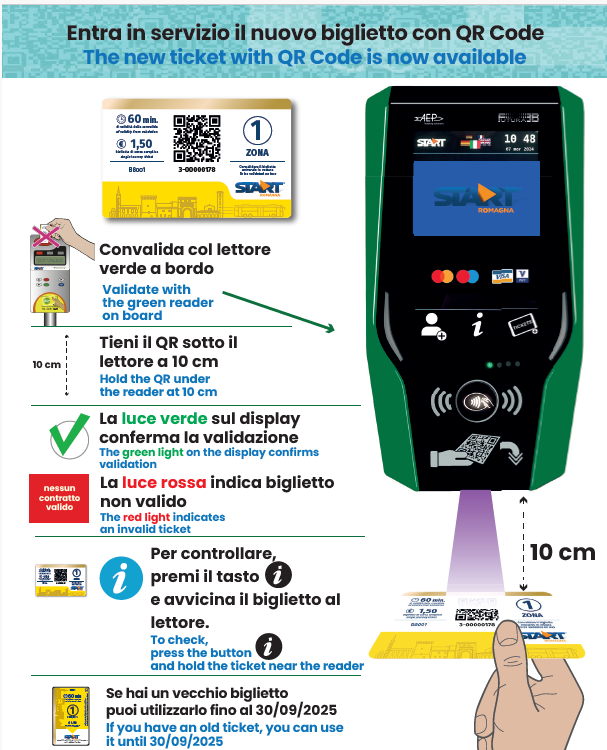
Validation of the ticket is carried out by placing the side of the ticket with the QR Code in front of the optical reader located under the validation device (emerald green validator, also usable for credit card payment – StarTap system).
A message on the display and an audible signal will confirm the successful validation.
The new system does not provide any stamping on the ticket; customers can always check the status of their ticket by pressing the (i) button on the green validator and scanning the ticket again under the reader.
In this way, customers will be able to view on the display all the information relating to the validity of the ticket.
On Start Romagna’s website it is always possible to check the remaining validity of the ticket, the remaining rides of a multi-ride ticket, or the validity of the ticket even before starting the journey!
Just connect here and scan the QR Code on the ticket or enter its code.
How to validate a Carnet
Useful answers
How do I validate a carnet when traveling with more people?
- Press the “person” icon
- Place the carnet QR Code under the green laser
- Add the number of passengers: for example, if there are 2 of us, I select 2; if 3, I select 3, and so on… always confirming with the green check ??
If I have doubts about whether the validation was successful, what should I do?
- Press the info button
- Place the carnet QR Code under the green laser: the display will show info such as the first validation zone and number of zones (on the first page). After 1–2 seconds, a second page will appear showing the expiration of the validation carried out, how many rides remain, and for how many passengers the ticket was validated.
When I press the info button, does the carnet need to remain under the reader the whole time?
Not necessarily. You can bring it close, and once the information starts to appear, move it away. In the video, I waited a few seconds, but it’s not essential to keep the ticket under the reader for the entire time the info is displayed.
If I am traveling alone, how can I validate my carnet?
- You can validate it as shown in the video (steps 1–2–3) and at step 3 simply select “1” and confirm with the green check ??
- Or you can simply pass the ticket under the green laser.
CONSULTA QUI GLI ORARI E I PERCORSI
Guarda gli Orari
 Ti serve il Biglietto?
LEGGI TUTTE LE INFO SUI BIGLIETTI E LE TARIFFE
Trova il Biglietto
 Viaggi spesso con noi?
RISPARMIA CON GLI ABBONAMENTI START
Scegli l’Abbonamento
 Sei un turista in visita?
ROMAGNA SMARTPASS, IL TUO BIGLIETTO UNICO
Scopri SmartPass
