





StarTap: pay onboard with a contactless card and validate your ticket
Start Romagna’s new way to travel easier and faster: pay with a contactless card and validate directly on the onboard validator.
What is StarTap
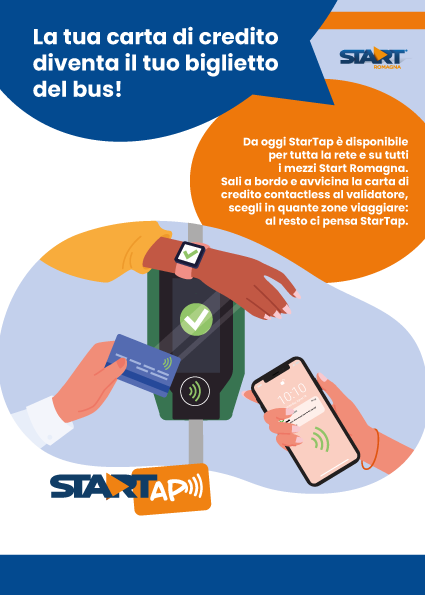
StarTap is the new way to pay onboard using contactless credit, debit or prepaid cards, or cards virtualised on your smartphone or smartwatch. It works with the new emerald-green onboard validator using EMV technology.
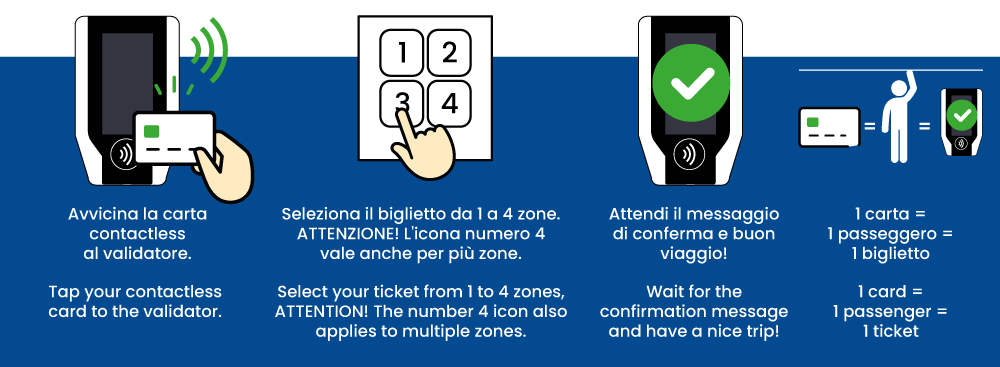
To pay your ticket, simply tap your card or device on the validator and select the ticket for 1, 2, 3 or 4 zones. At the end of the procedure, the validator confirms with a green light and an acoustic signal. No paper receipt is issued.
How to use StarTap step by step
- Make sure you have a contactless card from one of the following schemes: Mastercard, Maestro, Visa or VPay.
- You can also use a smartphone or smartwatch, as long as they are enabled for NFC payments.
- 1 card = 1 passenger. The system does not allow multiple tickets to be purchased at the same time with the same physical card.
Virtualised cards are considered different from the physical card: the same card can be used on your smartphone, smartwatch and as a physical card to purchase multiple tickets.
- Tap your card (or device) on the green validator, over the contactless symbol.
- On the screen, choose the ticket for 1, 2, 3 or 4 zones, depending on your journey.
- Check that you see the confirmation message, the green light and hear the acoustic signal (a “beep”).
If a red light appears or the first attempt fails, try again after a few seconds. If the second attempt also fails, you do not have a valid ticket and must purchase one via app (DropTicket, Roger or MooneyGo) to avoid a fine.
Which cards are accepted
The system supports contactless cards from the VISA, VPAY, MASTERCARD and MAESTRO schemes.
- Both physical cards and cards virtualised on smartphones and smartwatches are accepted.
- VISA cards can only be used in physical form.
- Virtualised VISA cards on smartphones or smartwatches cannot be used with StarTap.
Virtualised cards are treated as separate from the physical card: you can make multiple payments using the same card on different devices.
How much does it cost to travel with StarTap
Tickets purchased with StarTap cost the same as tickets bought through other sales channels: no extra fees.
- Fares are identical to those applied by authorised retailers.
- The ticket for 4 or more zones costs 4 €.
- For MASTERCARD cards, a pre-authorisation of 1,30 € is applied.
- For MAESTRO cards, the pre-authorisation is 12 €.
Actual charges may be processed a few days later: it is normal to see a temporary difference between “booked” amount and available balance.
Available tickets and validity
The system allows you to purchase tickets for 1 to 4 zones.
| Ticket | Fare | Validity | Best fare |
|---|---|---|---|
| 1 zone | 1,50 € | 60 min | 3,00 € from the 3rd tap |
| 2 zones | 2,50 € | 75 min | – |
| 3 zones | 3,50 € | 90 min | – |
| 4 or more zones | 4,80 € | 135 min | 8,00 € from the 2nd tap |
The system automatically applies the best fare available between single ride and day pass, based on how many trips you make with the same card within the day.
Ticket inspection and charge verification
- Tell the inspector the last 4 digits of the card you used.
- For virtualised cards, the number is different from the physical card: you can see it in your payment app or by pressing Info on the validator.
By pressing Info on the validator and tapping your card, you can view the validation time and the number associated with the card, with some digits hidden for security reasons.
On the Start Romagna website there is a dedicated reserved area where you can check the amounts charged to your card, the number of taps and the dates of purchase.
Charges may be grouped into one or more transactions and are not always processed in real time, so for a few days there may be a difference between booked amounts and available balance.
Validating the new QR Code tickets
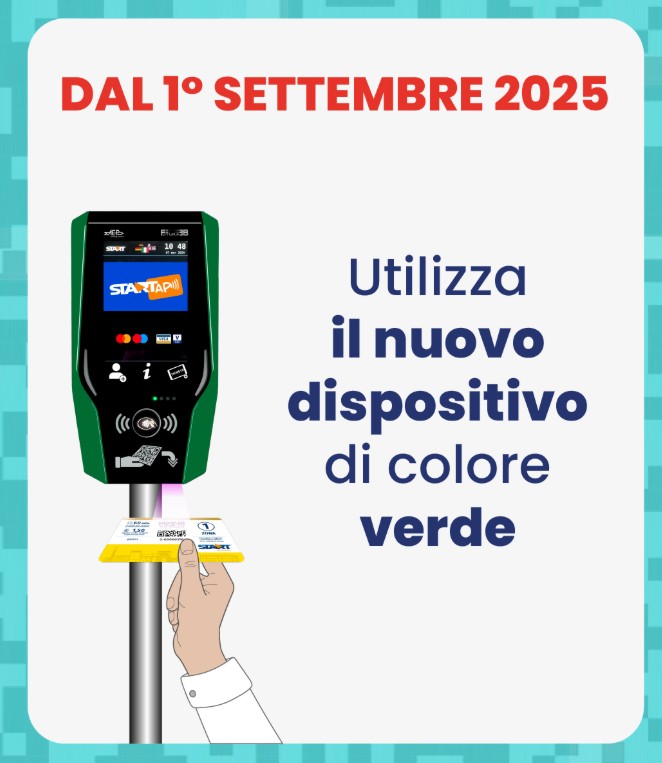
To validate your ticket, present the side with the QR Code to the optical reader located below the validator.
- Hold the ticket with the QR Code facing the optical reader.
- Bring the ticket close to the lower part of the validator.
- Wait for the visual signal (green light) and the acoustic signal.
Still have questions about StarTap?
For any information about the EMV system or onboard tickets, our customer service team is here to help.
SEE HERE THE TIMETABLES AND ROUTES
Look at the timetables
 Do you need the ticket?
READ ALL THE INFO ON TICKETS AND RATES
Find the Ticket
 Are you here on holiday?
RAIL SMARTPASS, TRAVEL WITH TRAIN AND BUS
Easy travel in all Romagna
 Are you a visiting tourist?
ROMAGNA SMARTPASS, YOUR SINGLE TICKET
Discover the SmartPass
